The HTTP Framing Problem
todo
 Caden Lund
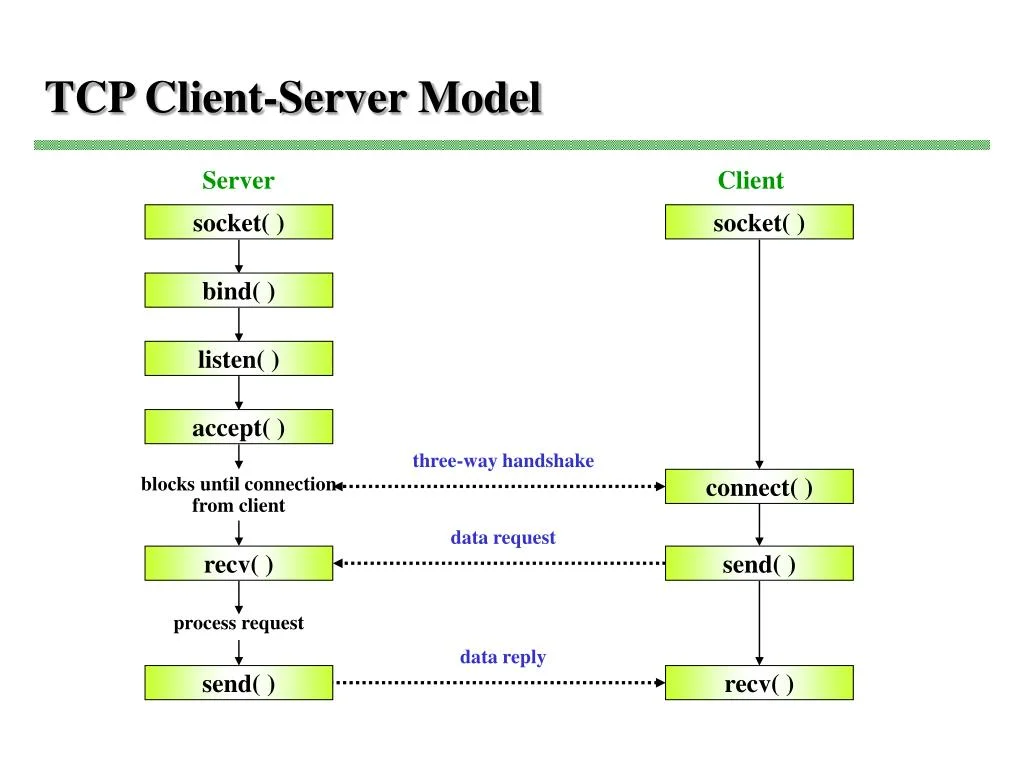
 - 1 How do programs talk to each other?: Files, Pipes, & Sockets
- 2 The HTTP Framing Problem

Building a Real-Time Markdown Editor with React
When I set out to build the blog editor for this site, I had a few requirements in mind: it needed to be fast, intuitive, and produce clean output. Here's how I approached it.
The Problem with WYSIWYG
Most rich text editors try to hide the complexity from you. They give you buttons and toolbars, but underneath they're generating messy HTML that's hard to version control and even harder to migrate.
Markdown solves this elegantly. It's:
- Portable — works everywhere
- Readable — even in raw form
- Version-control friendly — diffs make sense
- Future-proof — plain text never goes out of style
Why Not Use an Existing Solution?
There are plenty of markdown editors out there, but most of them are either too bloated or too limited. I wanted something that:
- Renders in real-time without lag
- Supports code highlighting out of the box
- Integrates seamlessly with my existing React setup
- Doesn't require a PhD to configure
The Learning Curve
Markdown has a gentle learning curve. Most developers already know the basics from writing README files. The syntax is intuitive enough that even non-technical users can pick it up quickly.
The Tech Stack
I settled on a simple but powerful combination:
| Library | Purpose |
|---|---|
react-markdown |
Rendering |
remark-gfm |
GitHub Flavored Markdown |
react-syntax-highlighter |
Code blocks |
Why These Libraries?
Each library was chosen for specific reasons:
react-markdown
This is the gold standard for rendering markdown in React. It's fast, well-maintained, and has a plugin system that makes it extensible.
remark-gfm
GitHub Flavored Markdown adds support for tables, strikethrough, task lists, and auto-linking URLs. These features are essential for a modern blog.
react-syntax-highlighter
Code highlighting is crucial for a dev blog. This library supports dozens of languages and themes, with lazy loading for optimal performance.
Code Highlighting
One of the most important features for a dev blog is proper syntax highlighting. Here's how it looks:
interface Post {
  id: number
  title: string
  slug: string
  content: string
  published: boolean
  created_at: string
}

async function fetchPost(slug: string): Promise<Post> {
  const response = await fetch(`/api/posts/${slug}`)
  if (!response.ok) {
    throw new Error('Post not found')
  }
  return response.json()
}
React Components
And for something more visual, here's a React component:
export function PostCard({ post }: { post: Post }) {
  return (
    <article className="border rounded-lg p-6 hover:shadow-lg transition-shadow">
      <h2 className="text-xl font-bold">{post.title}</h2>
      <p className="text-muted-foreground mt-2">{post.excerpt}</p>
      <time className="text-sm text-muted-foreground">
        {new Date(post.created_at).toLocaleDateString()}
      </time>
    </article>
  )
}
Backend Integration
On the server side, we use Go for handling API requests:
func (h *PostHandler) GetPost(w http.ResponseWriter, r *http.Request) {
    slug := chi.URLParam(r, "slug")

    post, err := h.store.GetPostBySlug(r.Context(), slug)
    if err != nil {
        writeError(w, "Post not found", "NOT_FOUND", http.StatusNotFound)
        return
    }

    json.NewEncoder(w).Encode(post)
}
Performance Considerations
The editor uses debounced auto-save to avoid hammering the API:
- User types content
- 300ms debounce timer starts
- If user keeps typing, timer resets
- When timer completes, save fires
- UI shows "Saving..." then "Saved X seconds ago"
This gives instant feedback without unnecessary network requests.
The Debounce Implementation
Here's the actual debounce hook I use:
function useDebounce<T>(value: T, delay: number): T {
  const [debouncedValue, setDebouncedValue] = useState(value)

  useEffect(() => {
    const timer = setTimeout(() => setDebouncedValue(value), delay)
    return () => clearTimeout(timer)
  }, [value, delay])

  return debouncedValue
}
The Math Behind Debouncing
If a user types characters with an average interval of ms and our debounce delay is ms, the number of API calls is approximately:
For a 6000-word post typed at 60 WPM with ms, that's roughly saves instead of individual keystrokes hitting the API. The savings scale with .
Measuring Performance
To ensure the editor stays snappy, I use React DevTools and Chrome's Performance panel. Key metrics I track:
- Time to First Paint — should be under 100ms
- Input Latency — typing should feel instant
- Memory Usage — no memory leaks during long editing sessions
The theoretical input latency for a controlled React component is:
For our editor, we keep ms (one frame at 60fps) by debouncing the preview and using local state for the textarea.
Note: The debounce time is a trade-off. Too short and you're making too many requests. Too long and users worry their work isn't being saved.
Styling and Theming
The editor supports both light and dark themes. The implementation uses CSS custom properties:
:root {
  --editor-bg: #ffffff;
  --editor-text: #1a1a1a;
  --editor-border: #e5e5e5;
}

[data-theme="dark"] {
  --editor-bg: #1a1a1a;
  --editor-text: #ffffff;
  --editor-border: #333333;
}
Typography
Good typography makes content easier to read. I use a carefully chosen font stack:
.prose {
  font-family: 'Inter', -apple-system, BlinkMacSystemFont, sans-serif;
  line-height: 1.75;
  font-size: 1.125rem;
}
What's Next
- Image uploads with drag-and-drop
- Keyboard shortcuts (Cmd+B for bold, etc.)
- Full-screen focus mode
- Auto-save with status indicator
- Split view editing
Future Improvements
There's always more to do. Some ideas I'm considering:
Collaborative Editing
Real-time collaboration would be amazing but complex. It would require:
- WebSocket connections
- Operational Transform or CRDT algorithms
- Conflict resolution strategies
- Presence indicators
AI Assistance
Integrating AI for writing suggestions could help with:
- Grammar and spelling
- Tone adjustments
- Content summarization
- SEO optimization
Thanks for reading. If you found this useful, check out my other posts on building with Go and React.
Recommended for You
Based on your interest in this topic
Comments
(0)